Claude replaced me.
My job is to teach you 'how’, of AI.

And I just replaced myself for you.
It looks like this once you set it up:


Take a deep breath. I will exactly show you how you can do it too - maybe one last time?
Two things before we start:
Step 1: Download my skill.
A Claude “skill” is a pre-made prompt that teaches Claude how to do things without you having to repeat yourself.
I wrote extensively here, for free.


You can now move to step 2.
Step 2: Upload my skill.
Claude skills can be easily imported from anywhere, but also shared with your entire team. That’s how I actually make most of my money: I make enterprise adopt Claude faster, and build custom skills & tools for them.
Send me a message on Linkedin if your team needs it.


You are now ready to test my skill.
Step 3: Test my skill.
A Claude skill is activated with a command (the slash “/”) + the name of the skill. So here you just start with /how-to to turn on the skill.


ELI5 = Explain like I’m 5. Claude understands this well.
You can go until the end and do pretty much anything.
I added an extra step if you want to use it even better.
Step 4: Use my skill even better.
This is not necessary. But this is how I use the Claude skill.

If you don’t know how to select a model, it’s here:
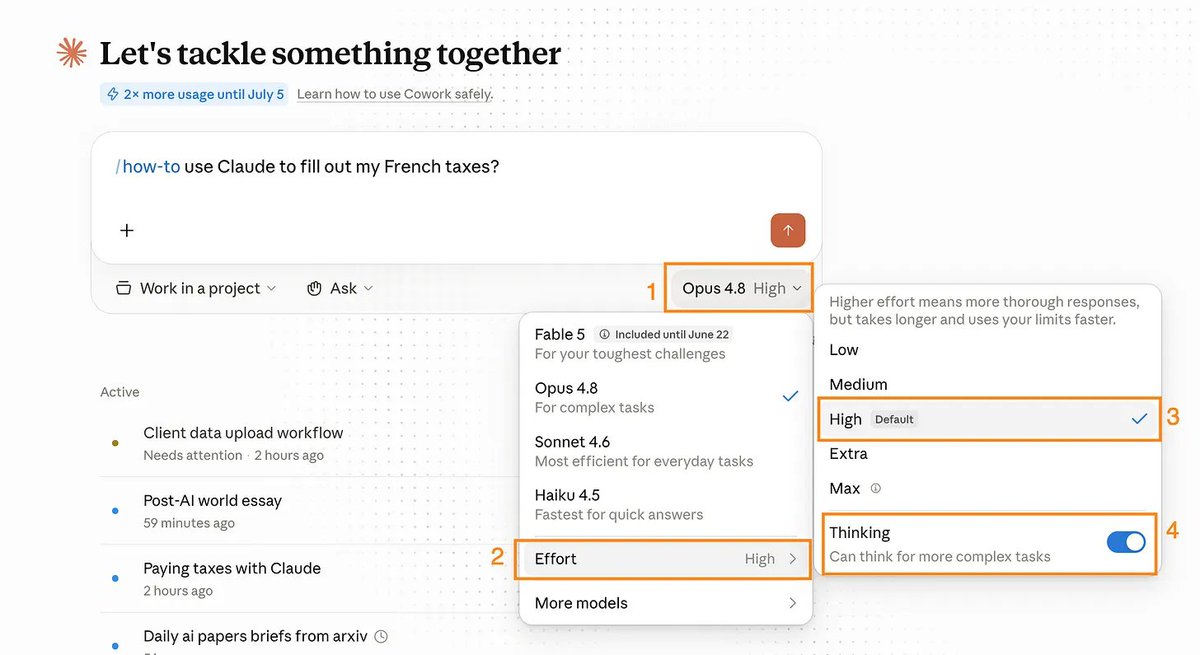
Claude Cowork is a better version of Claude. It’s even better if you know how to set up its folder and your files inside it.
I wrote a guide here if you want to learn how.
Or guess what… You can now ask your new skill!

OK, so now you replaced me. You don’t read my newsletter anymore.
I have just been replaced by Claude.
I guess there was no reason for so many people to read me.
But wait. Why do people read me?
But wait. Why do people read me?
Because I do a bloody good job at explaining how to do things.
700,000 people read my “how-to” guides twice a week.

But the how-to is the easy half of the job.
The new Claude skill gives you that now, clean, step by step.
You come back for the other half. The mess.
I test far more than I send you. Right now, I have 12 newsletters sitting in drafts.

I write them from a question someone asked me at a coffee shop, or a moment I caught myself thinking, “wait, I could actually build that.”
I only hit send when it’s worth your time.
This I’m afraid Claude can’t download. The skill is me. The newsletter is me.
And the only reason this one reached you today? Someone sent it to you.
Or you found me once, and now you keep reading me for free.
This thing grows one share at a time.
You know the person who needs it more than me. The one who’s afraid to be behind on AI. They won’t say it out loud. But you can feel it on them: the guilt, and that daunting panic of being the last one who hasn’t figured it out.
You can be the reason they start.
A message from the author, Ruben.
This article exists because 86,000+ people decided AI is too important to leave aside. Not only that, but they shared it around them. They understand they are the sum of the 5 people around them. So better have them using AI.
If this helped you — or if it’ll help someone you know — forward it to them. That’s how this grew. Just readers like you sending it to people like them.
And if you're new here, follow me on X →@rubenhassid (also free!)