@hooeem: Your agentic workflows are was...
Your agentic workflows are wasting your tokens. They’re wasting your money repeatedly for an orchestration loop. Here’s how you fix it and make your workflows 100x cheaper (yes, 100x cheaper).

In fact in testing it was found to be 128x, 296x, and 462x cheaper in the three tested domains, so 100x is an understatement.
The paper this research has come from has been written by Simon Dennis, Riviaan Patil, Kevin Shabahang, & Hao Guo from the University of Melbourne (I’ll link the paper in full at the end).
This article is going to tell you how to utilise their research so that you can make your agentic workflows 100x cheaper and the contents of this article is the following:
This guide can make your conversations up to 462x cheaper whilst keeping 87-98% of the frontier quality kept, so let's get started!
1: Why your agentic workflow costs so much
Okay, so you have a fixed procedure - an agentic workflow.
Then you have where this agentic workflow lives and depending on that single choice is exactly what drives the cost of your agentic workflow.
A: Orchestration
This is the most common setup you see today, this is where software sits on top of the model and, every single turn, injects instructions and decides where the conversation goes next.
The cost? $0.05-0.17 per conversation.
B: In-context
This is the "just prompt it" route, this is where you paste the whole workflow into the model's system prompt and you let it run yourself.
This is the most expensive approach, the cost? $0.10-0.33 per conversation.
C: Compiled
This is the method we're going to learn from the research paper - we teach a smaller model the procedure once and then we host it ourself.
The procedure is buried inside the model and the cost? $0.0003-0.001 per conversation.

2: The one idea to take away
If the shape of your workflow, it's steps, it's branches, it's order, doesn't change from one conversation to the next then why pay to describe it every time? FFFFFFFF*****CCCCCKKKKK THAT.
Go put the unchanging shape into the model itself and keep the prompt for the only thing that actually varies.
Look:

3: How?
Let's dive in...
Step 1: Draw the workflow as a flowchart
Map your procedure as boxes and arrows, yes, a frickin flow chart, each box is a turn each arrow is a possible next step. Mark the start and the ways a conversation can end.
Why? It's a precise way of writing down the procedure a computer can walk through automatically. If you're able to write down your agentic workflow then you're ready for step 2.
Step 2: Generate practice conversations from it
A frontier model such as Claude Sonnet will be able to walk through every sensible path that can be made from your flowchart and will write out realistic example conversations with varying details each time. This is how you teach it and to do this you need to get it to run 2000-6000 conversations which will cost around $40 in API calls. (you don't need to chat to your workflow 2000 times yourself lol)
Step 3: Fine tune a small model on those conversations
Take a small open model: the study used Qwen 2.5 (3 billion parameters) and Qwen3 (8 billion), and train it on the examples until it absorbs the procedure. It needs to learn the workflow in it's entirety not as a set of instructions it reads each time.
One important caveat from the study: this has to be a full retrain, not the cheap shortcut (LoRA), the shortcut was shown to fail at learning multi-step procedures.
Fine-tuning: taking an existing model and continuing its training on your own examples so it specialises. Parameters are the model's adjustable internals; 3–8 billion is small enough to run on a single rented GPU, versus the ~70× larger frontier models behind the paid APIs.
Step 4: Deploy it, with no orchestrator at all
Host the trained model yourself and let conversations fly. The model self-orchestrates from what it learned. The expensive parts of the old setup are simply gone.
Self-hosting: running the model on a machine you rent or own (the study used a cloud A100 at ~$2.50/hour) instead of paying a provider per token. This is where the ~65× per-token saving comes from.

I will be diving deeper into the build at the end of this article.
4: Does it hold up?
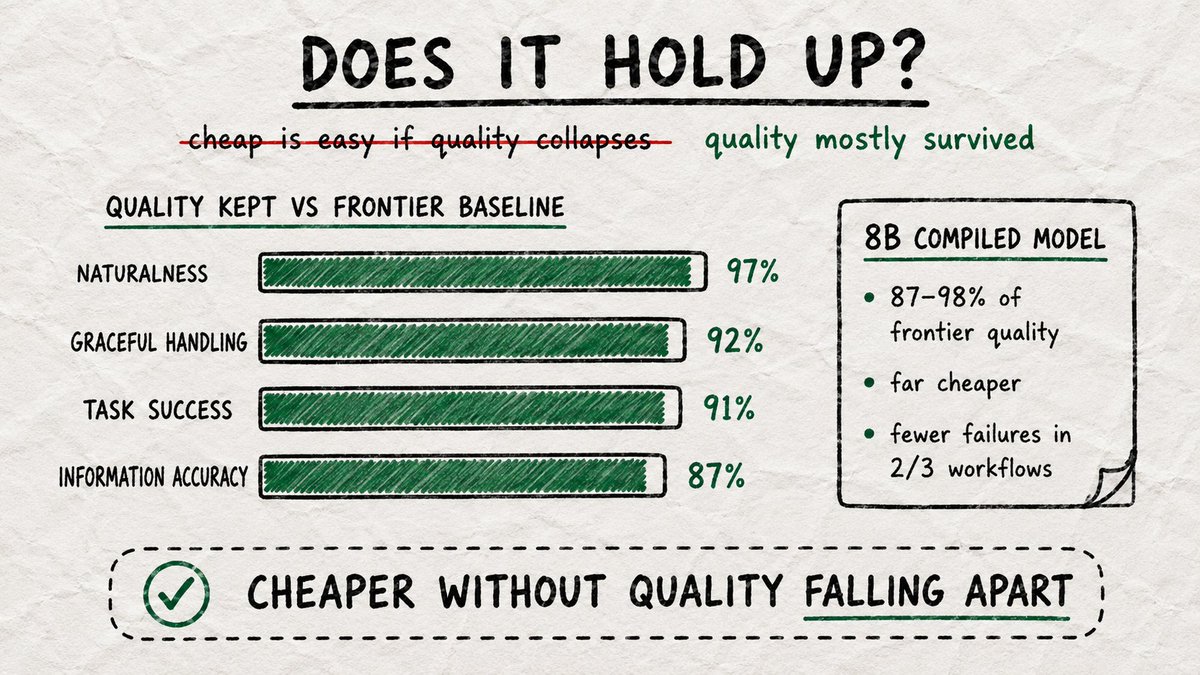
Cheap is easy if you don't care about quality. The study measured both, across three workflows, judged blind by an AI grader (and re-checked by a second, different grader).
They found that despite it being ridiculously cheaper, it's quality kept vs. the gold standard.
Overall the 8B compiled model scored 87–98% of the frontier in-context baseline. Not only that but in two of three workflows tested in the article the compiled model failed far less often than the orchestrator version.
5: How much does it cost?

6: Is this for you?
A strong fit when…
A poor fit when…

7: Building it
You do not need to understand every single nerdy thing that's going on, and you shouldn't expect to either. Think of it like building a house, you draw the plans, a builder does the construction.
Here we are simply deciding the workflow and we'll judge whether the result is good or not (nice).
Here's what we're about to do (we mentioned it briefly earlier but now we're going to give those who are actually going to do this the tools):
It should cost around $50-80 bucks to set this fucker up assuming you have a GPU to use and after 500 conversations with your agentic workflow it has already paid for itself!
Stage 1: Draw your workflow as a flowchart
Write down your procedure as a simple map: boxes for each thing that gets said, arrows for what can happen next, and a few clearly-marked endings (the customer is happy, the customer gives up, or it's handed to a human). That's it. If you can sketch your process on a whiteboard, you've done the hard part of this stage.
This is the one stage that is genuinely yours. You know your workflow better than anyone; nobody else can draw it for you.
A few tips from the study:
The flowchart as a file (procedure.json) The map is saved as a plain text file.
Here is a tiny travel-booking example; replace it with your own or get Claude to help you with it by explaining your workflow.
{
  "system_prompt": "You are a helpful travel booking assistant.",
  "start": "greet",
  "terminals": { "booked": "success", "abandoned": "abandonment", "escalated": "escalation" },
  "scenario_variables": {
    "destination": ["Japan", "Portugal", "Peru"],
    "budget_per_person": ["£650", "£900", "£2,000"],
    "trip_length": ["a weekend", "6 days", "two weeks"],
    "user_style": ["uncertain", "specific", "price-conscious"]
  },
  "nodes": {
    "greet":        { "role": "agent", "prompt": "Warmly greet the customer and ask what trip they'd like to book." },
    "user_request": { "role": "user",  "prompt": "You want {destination} for {trip_length}, budget about {budget_per_person} each. Be {user_style}." },
    "gather":       { "role": "agent", "prompt": "Ask ONE focused follow-up question about dates or interests." },
    "user_detail":  { "role": "user",  "prompt": "Answer, staying consistent with your budget and style." },
    "present":      { "role": "agent", "prompt": "Present 2–3 concrete options that fit the budget." },
    "user_choose":  { "role": "user",  "prompt": "React; pick one or ask for alternatives." },
    "confirm":      { "role": "agent", "prompt": "Summarise the choice and ask the customer to confirm." },
    "user_confirm": { "role": "user",  "prompt": "Confirm you're happy to book." },
    "booked":       { "role": "agent", "prompt": "Confirm the booking and close with one travel tip." },
    "abandoned":    { "role": "agent", "prompt": "Politely acknowledge they're not ready." },
    "escalated":    { "role": "agent", "prompt": "Explain you're handing off to a human specialist." }
  },
  "edges": [
    { "from": "greet", "to": "user_request" }, { "from": "user_request", "to": "gather" },
    { "from": "gather", "to": "user_detail" }, { "from": "user_detail", "to": "present" },
    { "from": "user_detail", "to": "gather", "condition": "needs more info" },
    { "from": "present", "to": "user_choose" }, { "from": "user_choose", "to": "confirm" },
    { "from": "user_choose", "to": "present", "condition": "wants alternatives" },
    { "from": "user_choose", "to": "abandoned", "condition": "not interested" },
    { "from": "confirm", "to": "user_confirm" }, { "from": "user_confirm", "to": "booked" },
    { "from": "present", "to": "escalated", "condition": "too complex" }
  ]
}
Here is a live artefact to help you with this stage:
https://claude.ai/public/artifacts/3f0bd0cf-980b-407c-a515-9880f66103e7
Stage 2: Let a clever AI have thousands of conversations with it
You don't need a pile of real customer transcripts to start. Instead, a top-tier AI (the study used Claude) walks every sensible route through your flowchart and writes out realistic example conversations, thousands of them, changing the details each time, like a different destination or a more sceptical customer. These examples are the "textbook" your small model will learn from.
The clever part: the finished examples read as completely natural dialogue. None of the flowchart labels show up in them. The procedure is hidden inside how the conversations flow which is exactly how the small model will end up learning it.
What it costs? $40 in usage.
For whoever runs it generate.py (the tested data generator). This walks the flowchart, writes each turn with a frontier model, and saves the conversations.
import json, random, os
from anthropic import Anthropic
client = Anthropic()                       # reads your ANTHROPIC_API_KEY
GENERATOR_MODEL = "claude-sonnet-4-5"       # the study used Claude Sonnet 4.5

F = json.load(open("procedure.json"))
NODES, EDGES = F["nodes"], F["edges"]; TERMINALS = set(F["terminals"].keys())

def enumerate_acyclic_paths(max_paths=10000):
    # List every distinct route through the flowchart (no box visited twice).
    # This gives even coverage of all endings — a simple random walk lopsidedly
    # over-samples short "gave up / escalated" routes (a bug found in testing).
    paths = []
    def dfs(node, seen, acc):
        acc = acc + [node]
        if node in TERMINALS: paths.append(acc); return
        for e in EDGES:
            if e["from"] == node and e["to"] not in seen and len(paths) < max_paths:
                dfs(e["to"], seen | {e["to"]}, acc)
    dfs(F["start"], {F["start"]}, []); return paths
ALL_PATHS = enumerate_acyclic_paths()

def fill(t, s):
    for k, v in s.items(): t = t.replace("{"+k+"}", str(v))
    return t

def generate_turn(node, scenario, history):
    who = "the booking AGENT" if node["role"] == "agent" else "the CUSTOMER"
    transcript = "\n".join(f'{m["role"].upper()}: {m["content"]}' for m in history) or "(start)"
    r = client.messages.create(model=GENERATOR_MODEL, max_tokens=400, messages=[{"role":"user","content":
        f"Write one turn as {who}.\nYOUR INSTRUCTION: {fill(node['prompt'], scenario)}\n"
        f"CONVERSATION SO FAR:\n{transcript}\n\nWrite only {who}'s next message, naturally. "
        f"No labels, no mention of any procedure."}])
    return r.content[0].text.strip()

def generate_conversation():
    path = random.choice(ALL_PATHS)
    scenario = {k: random.choice(v) for k, v in F["scenario_variables"].items()}
    turns = []
    for nid in path:
        node = NODES[nid]; role = "assistant" if node["role"] == "agent" else "user"
        text = generate_turn(node, scenario, turns)
        # Merge two same-role turns in a row into one (keeps a valid chat format —
        # another bug found and fixed in testing).
        if turns and turns[-1]["role"] == role: turns[-1]["content"] += " " + text
        else: turns.append({"role": role, "content": text})
    return [{"role": "system", "content": F["system_prompt"]}] + turns

def build(n=2125, eval_frac=0.10):           # the study's volume + 90/10 split
    convs = [{"messages": generate_conversation()} for _ in range(n)]
    random.shuffle(convs); cut = int(len(convs)*(1-eval_frac))
    os.makedirs("data", exist_ok=True)
    for name, part in [("train", convs[:cut]), ("eval", convs[cut:])]:
        with open(f"data/{name}.jsonl", "w") as f:
            for c in part: f.write(json.dumps(c)+"\n")
if __name__ == "__main__": build()
Stage 3: Train the small model on those conversations
Take a small, free, open model and let it study the practice conversations until it has absorbed the procedure. It doesn't memorise a rulebook to re-read each time, it picks up the workflow as a habit, the way a new employee eventually stops checking the manual.
It then needs a powerful graphics computer (a GPU).
The one rule you must insist on: it has to be a full training, not the popular cheap shortcut (called "LoRA"). The study tested the shortcut and it failed to learn multi-step procedures properly. If someone offers to do it the quick way, the answer is no.
For whoever runs it: the settings that matter, and the tested script. Base model: Qwen 2.5 (3B) for simple workflows, Qwen3-8B for complex ones. Full fine-tune, never LoRA. Learning rate 2×10⁻⁵, 10–20 passes over the data, keep the best version by held-out score.
import torch
from datasets import load_dataset
from transformers import AutoModelForCausalLM, AutoTokenizer
from trl import SFTConfig, SFTTrainer

BASE_MODEL = "Qwen/Qwen2.5-3B-Instruct"     # use "Qwen/Qwen3-8B" for complex workflows
tok = AutoTokenizer.from_pretrained(BASE_MODEL)
model = AutoModelForCausalLM.from_pretrained(BASE_MODEL, torch_dtype=torch.bfloat16)
ds = load_dataset("json", data_files={"train": "data/train.jsonl", "eval": "data/eval.jsonl"})

cfg = SFTConfig(
    output_dir="compiled-model",
    num_train_epochs=20,                    # 10–20 passes
    per_device_train_batch_size=2,
    gradient_accumulation_steps=8,          # effective batch 16 (use 32 for the 8B model)
    learning_rate=2e-5,
    lr_scheduler_type="cosine",
    bf16=True,
    optim="adamw_8bit",                     # lets it fit one GPU (needs bitsandbytes); use "adamw_torch" if you have plenty of memory
    eval_strategy="epoch", save_strategy="epoch",
    load_best_model_at_end=True, metric_for_best_model="eval_loss", greater_is_better=False,
    assistant_only_loss=True,               # learn the AGENT's turns only
    max_length=4096,                        # NOTE: this was called max_seq_length in older versions — the old name now errors
    report_to=[],
)
SFTTrainer(model=model, processing_class=tok,
           train_dataset=ds["train"], eval_dataset=ds["eval"], args=cfg).train()
Stage 4: Switch it on
Put the trained model on a computer you control. Its only instruction is a single line. The model runs the whole workflow from what it learned.
This is where the saving comes from: you're no longer renting a giant model by the word, and you're no longer re-sending the procedure on every reply. A whole conversation now costs a tiny fraction of a penny.
For whoever runs it: serve and query. The study used vLLM on a rented GPU (about $2.50/hour).
vllm serve ./compiled-model --max-model-len 4096 --port 8000The bottom line
Stop over paying for your agentic workflows on repeat. If your workflow is procedural, stable and high-volume, compiling it into a small self-hosted model is the natural move with near-frontier quality, fewer failures, and a cost that drops by two orders of magnitude with the advantage growing the more complex your workflow gets.
The article: https://arxiv.org/pdf/2605.22502

pls gib like lol