@aswincode: I posted this on X yesterday a...
I posted this on X yesterday and a lot of folks have been asking how we built it. Here's how.
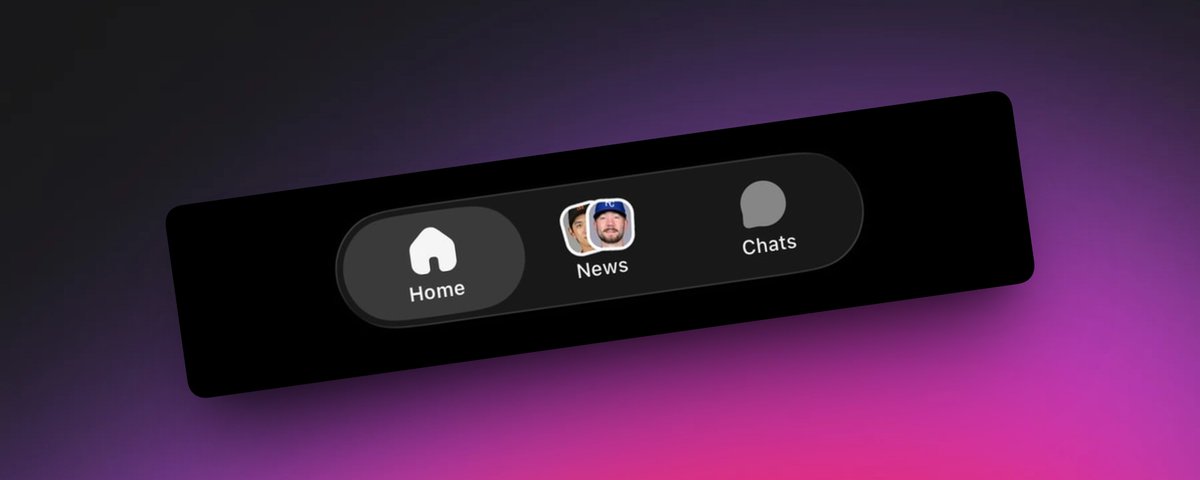
https://x.com/i/status/2051311805926965597
We explored a tiny, fun thing in the Turf iOS app: a dynamic and personalized tab icon. Instead of a static image asset, the News tab shows two stacked thumbnails pulled from the latest news that is actually relevant to you. Tap around the app, your feed changes, your tab icon changes with it.
This was a fun reminder that good design engineering is a full-stack discipline. What you see is one tab icon. Keeping it personalized, current, and ready before the tab bar paints took work across the backend, the edge, and the client all at once.
Turf is built around prediction markets and live moments. The News tab is one of the surfaces where personalization shows up most: the articles you see are scoped to the leagues, teams, and topics you care about. We wanted the tab itself to reflect that, not just the screen behind it. A tab icon that hints at "here is what is fresh for you right now" is a small, persistent reminder that the app is paying attention.
Constraints
We use Expo Router and, on iOS, the new native tabs API (expo-router/unstable-native-tabs). Native tabs are great because you get the real UITabBar, liquid glass on iOS 26, system minimize-on-scroll, badges, all of it. The tradeoff is that you live inside UITabBarItem's rules.
For an icon, NativeTabs.Trigger.Icon accepts an SF Symbol name, an Android Material Symbol, an image (local bundle or remote URL), or a local Xcode asset.
A local Xcode asset would have been the natural fit. It paints instantly because it's already in the bundle, but it's frozen at app-build time and can't be personalized. Anything you swap it out for has to be downloaded while the app is open, which means the user pays for that round-trip with their first glance at the tab bar. We wanted the opposite: the icon ready by the time the user looks at it, dynamic without paying a latency tax for it.
So the icon needs to be a URL: one that's cheap enough to resolve that we can prefetch it during normal app warmup and have it sitting in the image cache before the tab bar ever paints. And that URL needs to deterministically render a small PNG that composites two thumbnails into our "stacked rounded rect" look.
Render the icon at the edge
We built a small Cloudflare Worker that exposes a single route, roughly:
GET /tab-feed?left=<url>&right=<url>
It returns an aggressively cached PNG that stacks two thumbnails with the exact tilt, white rim, shadow, and border-radius our design wanted. The mobile app composes the URL with the user's two latest news thumbnails, prefetches it, and hands the result to NativeTabs.Trigger.Icon as a remote ImageURISource.
Two layers, one URL.
Worker side: Satori + Resvg, all WASM
The Worker is intentionally simple. On every request it validates inputs (length-capped, http/https only), hashes them into a deterministic cache key alongside a LAYOUT_VERSION env var, and looks up the rendered PNG in the Workers Cache API. If it hits, we return the cached Response. If it misses, we render once and write the result back via waitUntil so the response isn't blocked by the cache write. Cache headers are aggressive (a day at the browser, a week at the CDN, immutable) because the route is a pure function of (version, left, right). To retune the visual (radius, tilt, shadow), we bump LAYOUT_VERSION and every cached PNG invalidates without changing the public URL contract.
We also save every rendered PNG to R2, Cloudflare's object storage. The edge cache is fast but it lives at each location separately and can drop entries when it fills up. R2 is shared across all locations and keeps the file around. So if a request lands somewhere that hasn't seen this icon before, the worker grabs the PNG straight from R2 instead of re-rendering, and stashes a copy locally for the next visitor. The render path only runs the very first time we see a new (version, left, right) combination.
The render itself runs Satori for layout and Resvg-WASM for rasterization, with Yoga-WASM providing flexbox under Satori. All three work inside a Worker because WASM is a first-class module type there, so we get JSX-flavored layout → SVG → PNG without spinning up Node or any image microservice. WASM init runs once per isolate; everything after that is pure render.
If you want to play with this kind of JSX-flavored layout before wiring it into a Worker, Vercel's OG Playground, built by @shuding (who also created Satori), is the fastest way to iterate on it in a browser.

The element tree is two <img> nodes with transform: rotate(-8deg) and rotate(6deg), white borders, soft drop shadows, and rounded corners. Rendering at 3× the canvas width keeps the PNG crisp on retina screens.
Mobile side: build URL, prefetch, hand to native tabs
The client never reaches into the Worker beyond constructing a URL. It composes the request, calls Image.prefetch, and only flips the tab icon source over once prefetch resolves:

Two details that mattered in practice:
End-to-end:
A few alternatives that didn't make the cut, and why:
Gotcha's
Design engineering is a full-stack discipline
Design engineering isn't just frontend work. The thing I keep coming back to with this build is that what looks like a UI feature is almost entirely infrastructure work. The tab icon you see is a tiny PNG, but the reason it feels effortless is everything that happens before you ever look at it: the backend returns the right news, an edge worker stamps a custom image and caches it within milliseconds of where you are, and the client prefetches it during normal app warmup, so by the time the tab bar goes to paint, the image is already in cache.
That's the version of design engineering I care most about. The UI is the receipt. The user should never feel a latency cost, should never see a layout shift, and should never wait on a spinner for something the system could have prepared in advance. It's the backend's job to hand the UI the best possible data, the edge's job to make sure that data is already nearby when it's needed, and the client's job to make sure none of that work is visible.