@milesdeutscher: ## In 10 minutes, you’ll never...
In 10 minutes, you’ll never hit a Claude token usage limit again.

Let's be honest with each other, Claude's usage limits suck.
I'm sure you know the feeling: you're deep in a Claude prompting session, and out of nowhere, you've suddenly hit your account's usage limit for the next few hours.
Before I implemented these strategies, this happened to me regularly (even on the $200/month Anthropic plan), and rate limits were a huge bottleneck on my productivity.
Because rate limits were significantly hindering my work, I dove deep to understand first how Claude really works and, second, why I was constantly hitting these limits.
What I discovered was that I was actually using Claude completely wrong.
The good news is I've since fixed my usage limit issues by learning to use Claude properly, and for the past three weeks, I haven't hit a single token rate limit.
In this article, I'll explain exactly how, and hopefully, you guys will find value in replicating my framework.
At the very end, I included a free PDF with all the tips from this article. You can just plug it into Claude to fully optimise your account for less total token usage.
Step One: Planning
Before you send a single Claude prompt, you need to know exactly what you want.
I can pretty much guarantee that if we audited your Claude account, you'd see a ton of wasted prompts on brainstorming.
While Claude is an excellent brainstorming tool, using Opus for it is a mistake.
Instead, I highly recommend using a cheaper model (like Haiku) for dedicated brainstorming and switching to an expensive model only once you know what you want.

We'll dive deeper into model selection later.
You also have to understand how Claude really works.
Sending simple text chats isn't what burns tokens.
Drawing, coding, and building are what drain your account.
This is why one of the biggest tips I can give you is to spend more time planning (preferably with a cheaper model) and only switch to Opus when it's time to build.
For example: Two people are trying to vibe-code a finance tracking app
Person A: Spends 2 minutes planning and has to rebuild the app 3 times.
Person B: Spends 20 minutes planning and only builds the app once.
Believe it or not, Person B saves ~67% (about $1.50) on this task alone.

To take this a step further, you can use the dedicated 'Plan Mode' inside Claude Code.
Plan Mode tells Claude to explicitly focus on planning.
Press Shift + Tab Twice or /Plan
TLDR: Spend more time planning, and use cheaper models for this brainstorming/planning phase.
Step Two: Chat Length
Long chats are a silent killer.
If you continuously use a single chat for the same task, I really want you to understand this:
Using a long chat is essentially telling Claude to keep re-reading old context.
Not only does this use more tokens and take longer, but it also dilutes your output quality with irrelevant information.
There are a couple of good solutions:
Instead of using a single chat for repetitive tasks, set up a project to manage multiple chats.
For example, I have a dedicated X-Writing project with multiple sub-chats:

Anytime I want to write a new piece, I open up a brand new chat in this project, which understands all my instructions.
Pro Tip: Within these projects, you can just tell Claude that you're trying to save on token usage.
Just put something like this into your instructions:
```
"Be cognisant of the fact I'm trying to save account usage. Be concise in your answers, and when appropriate, advise me on when I should start a new chat or any other tips that may help me reduce token usage."
```Secondly, if there's a chat you reuse for the same task, you can tell Claude something like:
"I'm moving to a new chat; give me a prompt I can use to restart this session without losing any of our context from this conversation."
With these two methods, you'll never have to rely on single, long chats again.
Remember: 3 single chats are better than one extremely lengthy chat
Step Three: Proper Memory
One of the biggest issues with Claude is that it often forgets context, and you have little control over what Claude actually remembers about you.
This results in you having to re-explain yourself, which means you use more tokens than necessary.
I wrote an entire in-depth guide on how to fix this problem (3 strategies), but let me summarize the quickest strategy now.
https://x.com/i/status/2046966170868486512
You want to create a new desktop folder with two markdown files:
This file tells Claude all your rules & instructions:
Example:
Who you are
What you do
Rules
Important to include in this file:"Update Memory .MD with my preferences over time."
This line is crucial; it's how you get Claude to create a running memory log of your data in the second markdown file.
This is the "brain" of Claude, and it gets continuously updated over time.
Example:
Preferences
Corrections
Patterns
Now, whenever you say something like "stop using em dashes," Claude will read your instructions file and know to go into this memory file and update it.
Just make sure to attach your folder to Claude Code/Cowork so it can access these files.
If you're having trouble building these files, just ask Claude for help.
Once you use this system, you'll never go back.
Step Four: Model Stacking & Selection
I briefly touched on proper model selection earlier; now let's dive deeper.
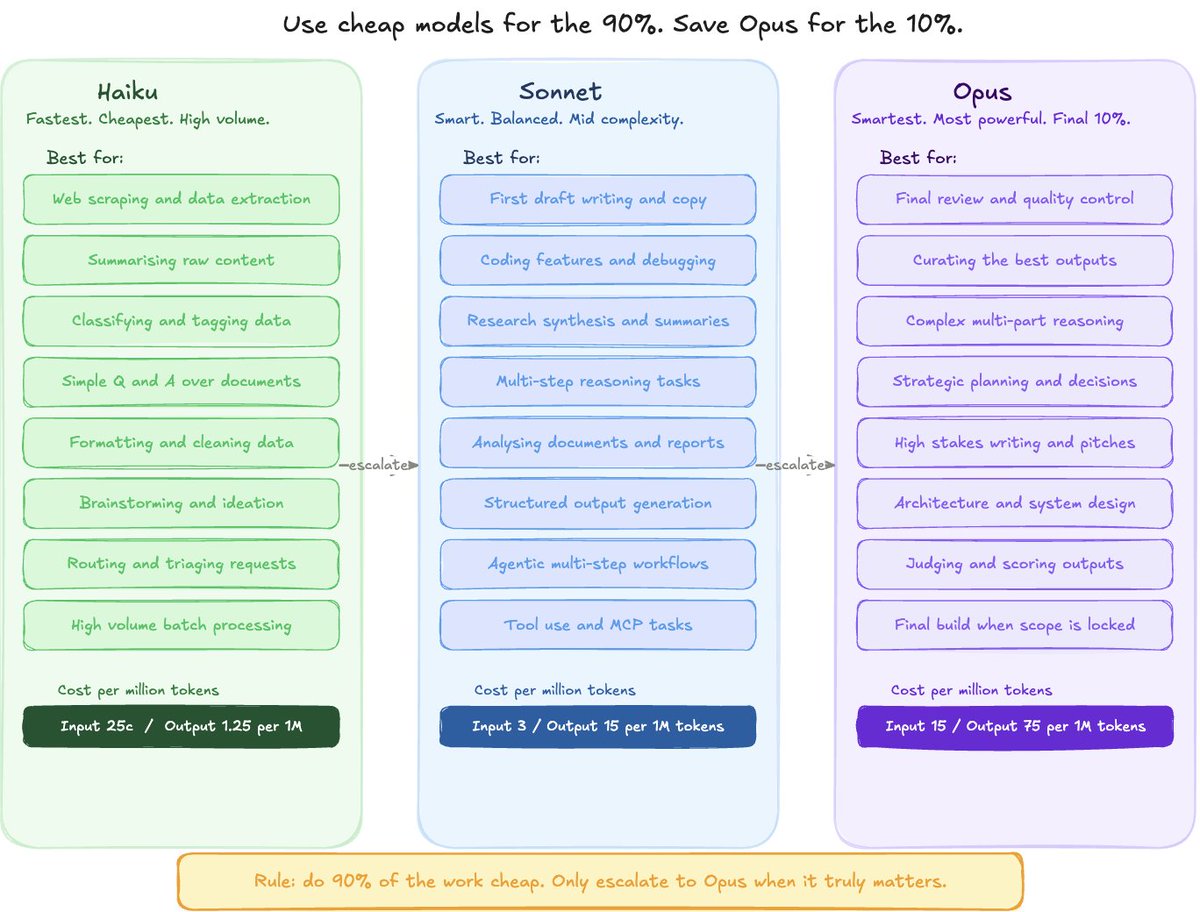
Using Opus 4.7 for everything is a complete waste. You can use other models for 90% of tasks and rely on Opus for the last 10%.
I like to run an "escalate" system where I start with the cheapest model, and only work my way up to Opus when needed.
Start with Haiku (light tasks) → Sonnet (medium tasks) → Opus (heavy tasks and final curation/execution).
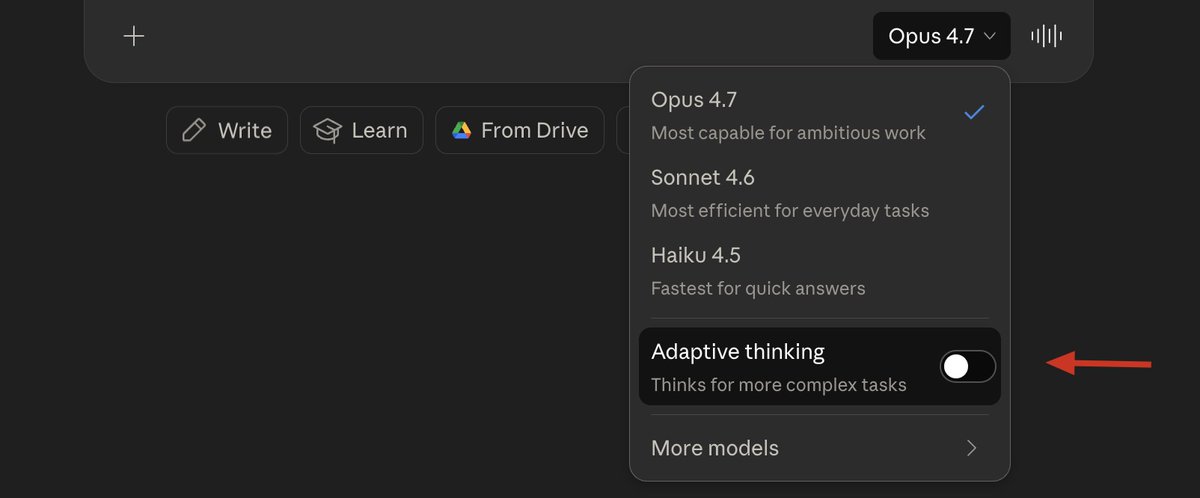
A few more model selection tips
Leave this off most of the time.
Most people don't know this exists, but on the main Claude homepage, there are 'Styles.'
You can switch your style to "Concise" to tell the model you're using to give short, concise replies.

In Claude Code, you can select "Low" effort for most tasks.

Lastly, you don't need to use Claude for everything.
Don't be afraid to rely on open-source models like Kimi or DeepSeek, which are extremely good and cheap.
There's no need to use Claude for simple tasks like news and research scraping.
Step Five: Tool Splitting & Optimisations
Most people don't realize that various Claude tools have different usage parameters.
For example, Claude Code/Chat uses the same usage under your overall plan, while Claude Design is completely separate.
Understanding this and knowing when to swap between Claude tools is critical for optimising your account usage.
To get the most out of your account, stick to each respective tool for what it was built for.
For example, you don't want to waste Claude Code tokens designing visuals when you have unused Claude Design tokens lying around.
Some Final Tips
Closing
I don't expect AI usage to get any cheaper.
That's why learning how to properly maximise your account usage now is critical if you want to save money long term.
I hope you found my tips here helpful in doing so.
If you did, be sure to follow me @milesdeutscher - I share articles just like this based on my real learnings and experiences with AI.
As promised, the full PDF that has all the tips discussed here is attached below.
All you have to do is sign up for the AI Edge newsletter (free) and join my Instagram community to access the Google Drive where it's posted (free).
https://www.aiedgehq.co/

100% free, no spam ever, and unsubscribe anytime