@PawelHuryn: Anthropic has quietly shipped ...
@PawelHuryn
38 views
Apr 23, 2026
Advertisement
1
Anthropic has quietly shipped third-party inference for Cowork and Code in Claude Desktop.
This should work with local models or OpenRouter via LiteLLM proxy.
Is it just me?
This should work with local models or OpenRouter via LiteLLM proxy.
Is it just me?


2
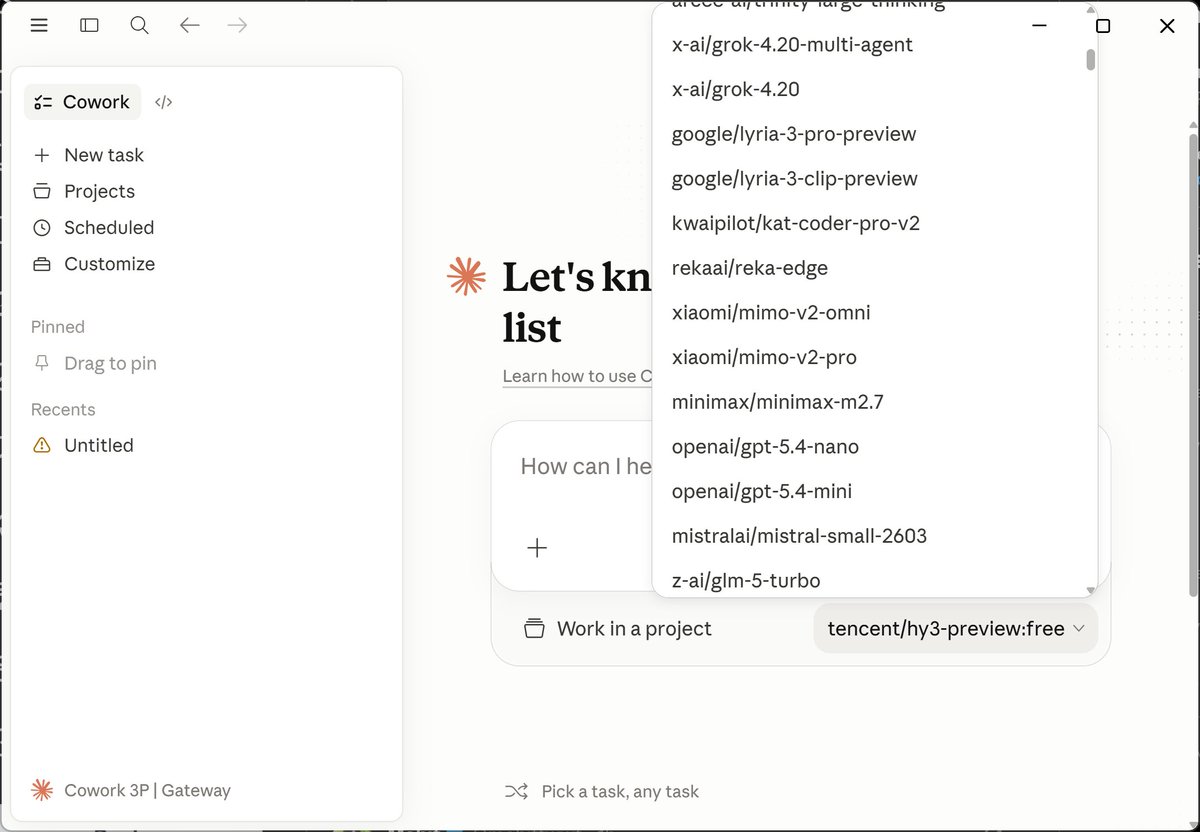
This is wild. No proxy needed for @OpenRouter. Just set your URL to openrouter.ai/api
Step 1: Menu > Developer > Configure Third-Party Inference
Step 2:
- Connection: Gateway
- Gateway base URL: openrouter.ai/api
- Gateway API key: Your OpenRouter Key
- Gateway auth scheme: x-api-key
Step 3: [Apply locally] > [Relaunch now]
Step 1: Menu > Developer > Configure Third-Party Inference
Step 2:
- Connection: Gateway
- Gateway base URL: openrouter.ai/api
- Gateway API key: Your OpenRouter Key
- Gateway auth scheme: x-api-key
Step 3: [Apply locally] > [Relaunch now]
3
@OpenRouter (Log out, sometimes it doesn't work)
Step 4: Configure with Gateway (No Anthropic account needed)
Step 4: Configure with Gateway (No Anthropic account needed)

4
@OpenRouter Step 5: You will see "Setting up Claude's workspace..." but you can start chatting.

5
@OpenRouter Not everything works as expected:
Customize > Skills: Available to upload, empty
Customize > Plugins: Available to upload, empty
Customize > Connectors: Unavailable
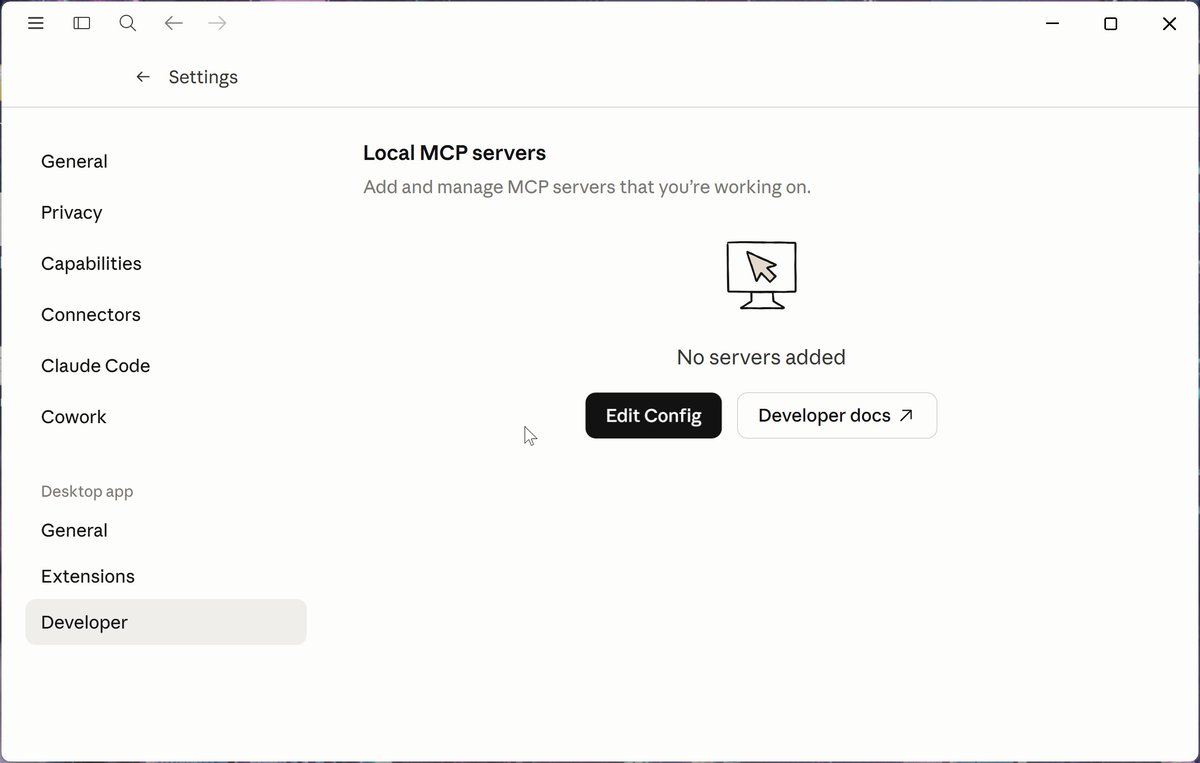
You can add local MCP servers under Settings > Developer. They get a dedicated claude_desktop_config.json file.
Customize > Skills: Available to upload, empty
Customize > Plugins: Available to upload, empty
Customize > Connectors: Unavailable
You can add local MCP servers under Settings > Developer. They get a dedicated claude_desktop_config.json file.


6
It might be a good idea to install the official Claude Desktop skills like docx, pdf, ppts, skill-creator, xlsx from: github.com/anthropics/ski…
Knowledge work plugins (legal, finance, marketing, product-management) are available here: github.com/anthropics/kno…
Plugins for the Code tab: github.com/anthropics/cla…
Knowledge work plugins (legal, finance, marketing, product-management) are available here: github.com/anthropics/kno…
Plugins for the Code tab: github.com/anthropics/cla…
7
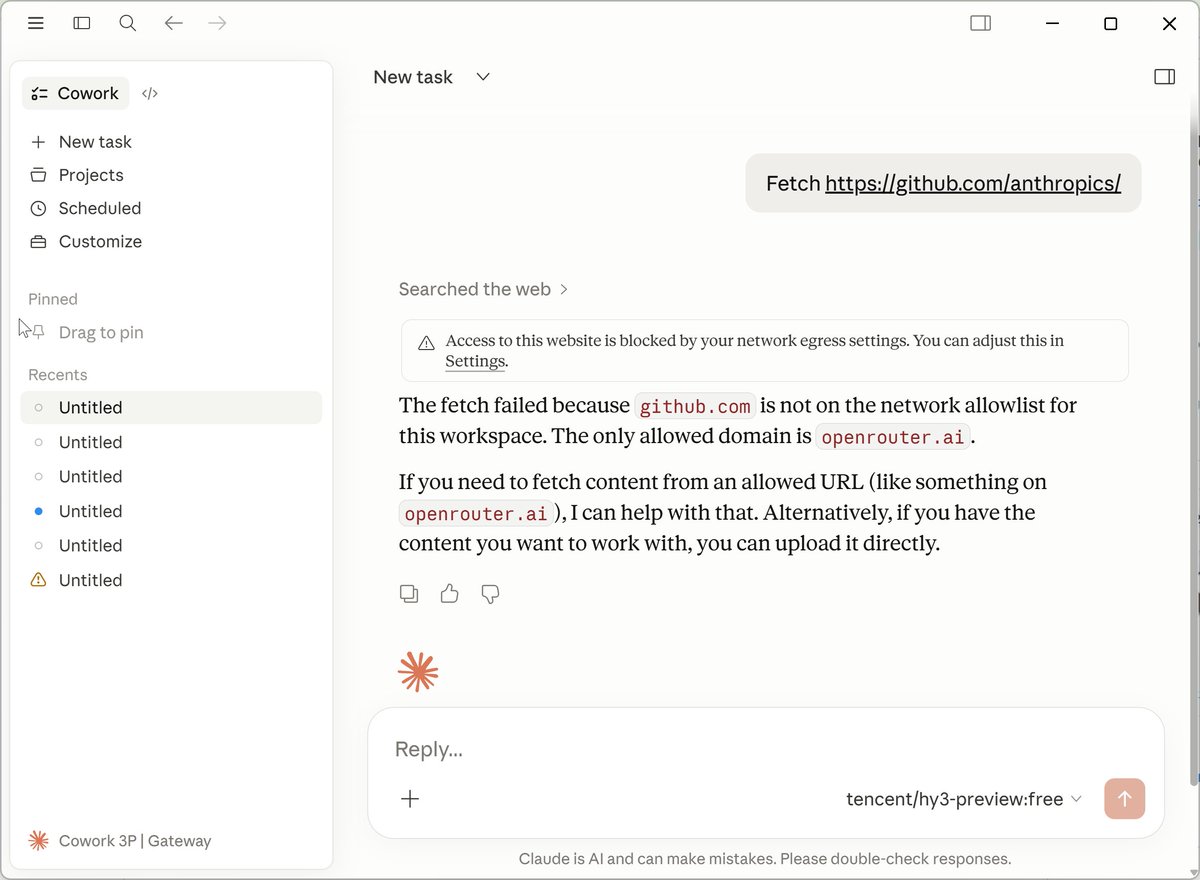
@OpenRouter I hit some issues, too. In the Code tab, the agent can access web. Cowork fails with that.
"Network egress setting" that would solve the problem are NOT available in Capabilities. But there is a solution.
"Network egress setting" that would solve the problem are NOT available in Capabilities. But there is a solution.

8
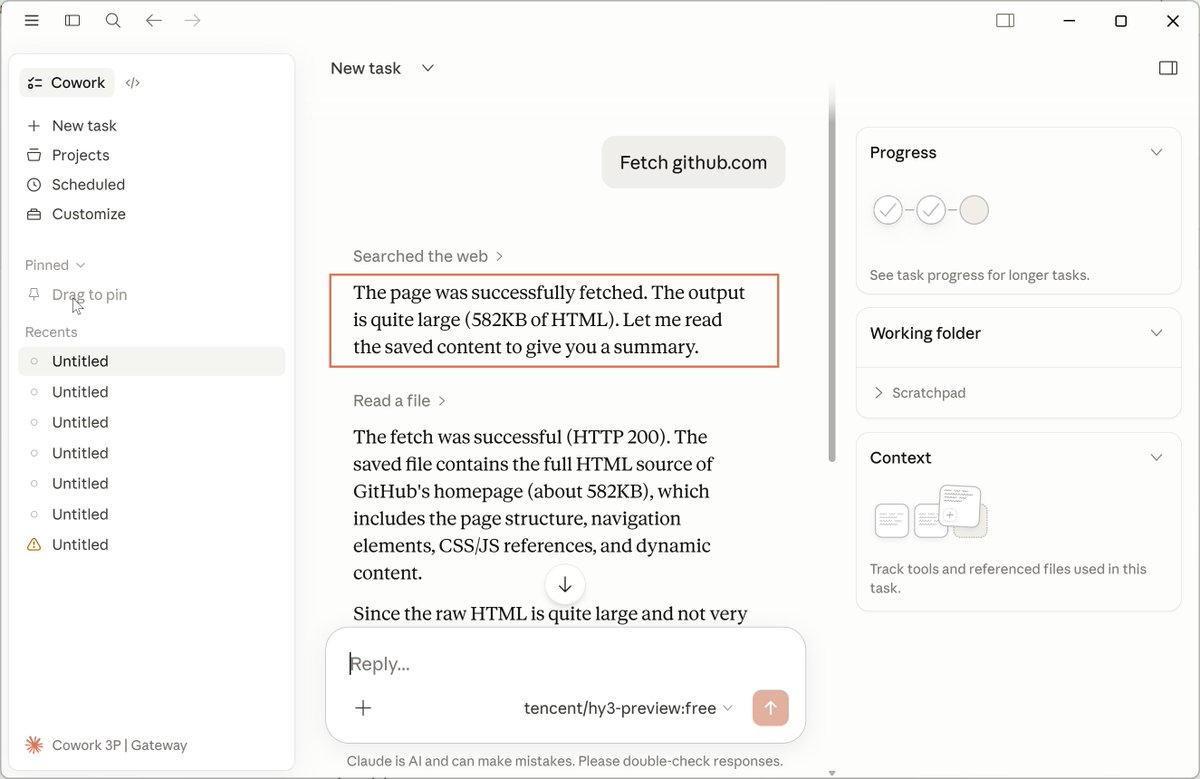
@OpenRouter Sign out > Switch back to Claude Desktop by Anthropic > Developer > Configure Third-Party Inference.
In the Sandbox & workspace configure "Allowed egress hosts."
[Apply locally] > [Relaunch now] > It works!
In the Sandbox & workspace configure "Allowed egress hosts."
[Apply locally] > [Relaunch now] > It works!

9
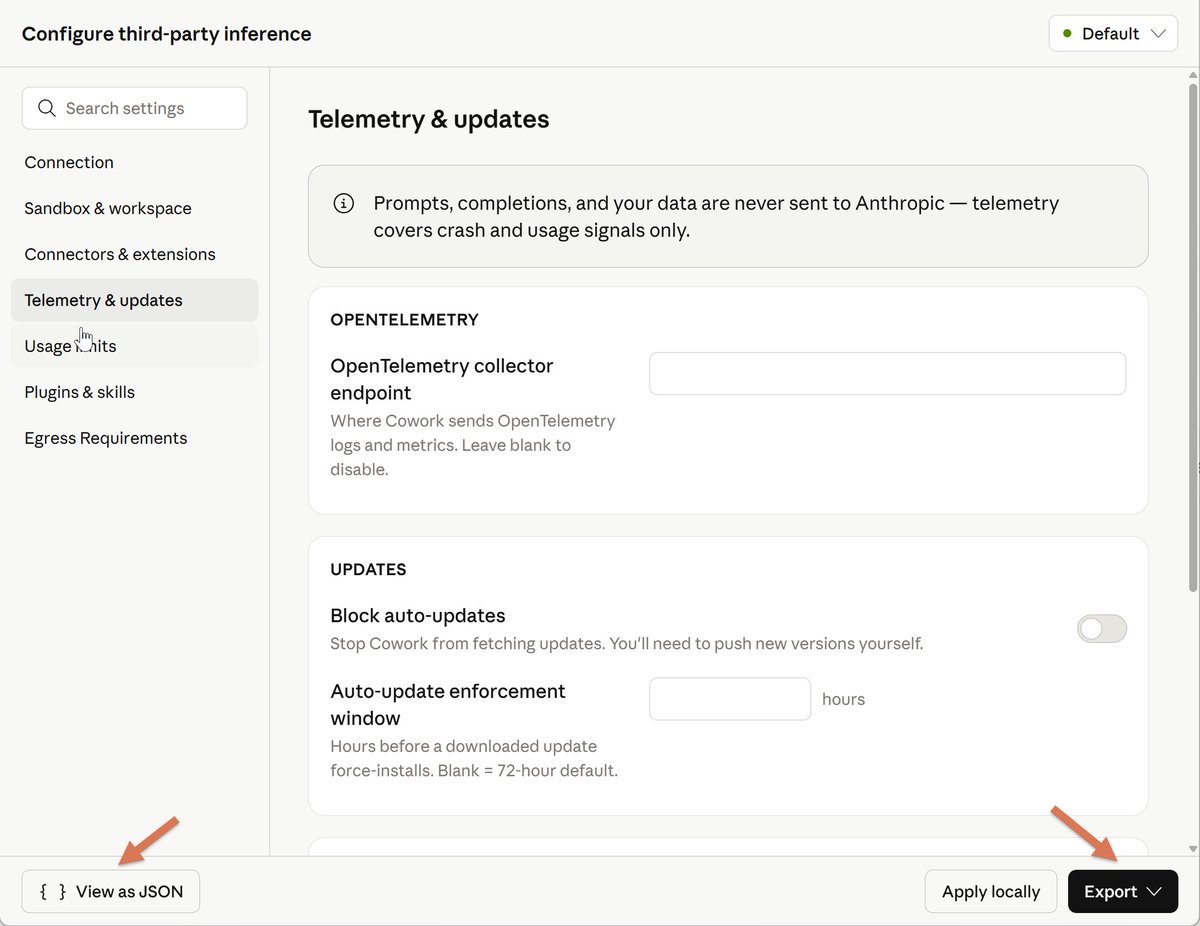
The "Configure third-party inference" provides many options for enterprises:
- Max tokens per window (per-user soft cap)
- Allow user-added MCP servers
- OpenTelemetry collector endpoint
- Block auto-updates
- Built-in tools removed from Cowork
From the official docs: "Cowork on 3P is designed for organizations whose security, regulatory, or contractual requirements prevent them from sending data to Anthropic’s first-party infrastructure."
Still, I can access it on my personal Max 20x plan.
The official doc I just found: claude.com/docs/cowork/3p…
- Max tokens per window (per-user soft cap)
- Allow user-added MCP servers
- OpenTelemetry collector endpoint
- Block auto-updates
- Built-in tools removed from Cowork
From the official docs: "Cowork on 3P is designed for organizations whose security, regulatory, or contractual requirements prevent them from sending data to Anthropic’s first-party infrastructure."
Still, I can access it on my personal Max 20x plan.
The official doc I just found: claude.com/docs/cowork/3p…

10
As I'm testing this, one limitation with @OpenRouter is that it doesn't support web search.
Options:
1. Add WebSearch to "disabledBuiltinTools" and use a custom MCP instead (e.g., @brave - 2,000 free requests/month or $3/1,000 requests).
{
"mcpServers": {
"brave-search": {
"command": "npx",
"args": [
"-y",
"@modelcontextprotocol/server-brave-search"
],
"env": {
"BRAVE_API_KEY": "YOUR_API_KEY_HERE"
}
}
}
}
2. Use Google Cloud’s Vertex AI or Microsoft Foundry as providers. Amazon Bedrock doesn't support that yet.
3. Ask @alexatallah if they could implement Anthropic’s web_search server tool (e.g., routed to Perplexity)
More: claude.com/docs/cowork/3p…
Options:
1. Add WebSearch to "disabledBuiltinTools" and use a custom MCP instead (e.g., @brave - 2,000 free requests/month or $3/1,000 requests).
{
"mcpServers": {
"brave-search": {
"command": "npx",
"args": [
"-y",
"@modelcontextprotocol/server-brave-search"
],
"env": {
"BRAVE_API_KEY": "YOUR_API_KEY_HERE"
}
}
}
}
2. Use Google Cloud’s Vertex AI or Microsoft Foundry as providers. Amazon Bedrock doesn't support that yet.
3. Ask @alexatallah if they could implement Anthropic’s web_search server tool (e.g., routed to Perplexity)
More: claude.com/docs/cowork/3p…

11
The easiest way to import the missing Anthropic skills (no-code, no-agent version):
1. Download this repo as .zip: github.com/anthropics/ski…
2. Extract skills-main[.]zip, go inside
3. Zip selected skill folders again, e.g., docx folder > docx[.]zip
4. In Claude Desktop click: Customize > Skills > Create skill > Upload a skill > Upload each skill you need (docx[.]zip, pptx[.]zip, etc.)
Don't import skills you don't need. It's about your context window (they have an impact even when not fully loaded).
1. Download this repo as .zip: github.com/anthropics/ski…
2. Extract skills-main[.]zip, go inside
3. Zip selected skill folders again, e.g., docx folder > docx[.]zip
4. In Claude Desktop click: Customize > Skills > Create skill > Upload a skill > Upload each skill you need (docx[.]zip, pptx[.]zip, etc.)
Don't import skills you don't need. It's about your context window (they have an impact even when not fully loaded).
12
The easiest way to import Anthropic knowledge work plugins (no-code, no-agent version):
1. Download this repo as .zip: github.com/anthropics/kno…
2. Extract knowledge-work-plugins-main[.]zip, go inside
3. Zip selected plugin folders again, e.g., marketing folder > marketing[.]zip
4. In Claude Desktop click: Customize > Personal plugins > + > Create plugin > Upload plugin > Upload each plugin you need (marketing[.]zip, product-management[.]zip, legal[.]zip, etc.)
Don't import plugins you don't need. Sometimes 0. Max 2-3.
1. Download this repo as .zip: github.com/anthropics/kno…
2. Extract knowledge-work-plugins-main[.]zip, go inside
3. Zip selected plugin folders again, e.g., marketing folder > marketing[.]zip
4. In Claude Desktop click: Customize > Personal plugins > + > Create plugin > Upload plugin > Upload each plugin you need (marketing[.]zip, product-management[.]zip, legal[.]zip, etc.)
Don't import plugins you don't need. Sometimes 0. Max 2-3.