@thisdudelikesAI: 🚨BREAKING: Someone just open-s...
@thisdudelikesAI
30 views
Mar 12, 2026
1
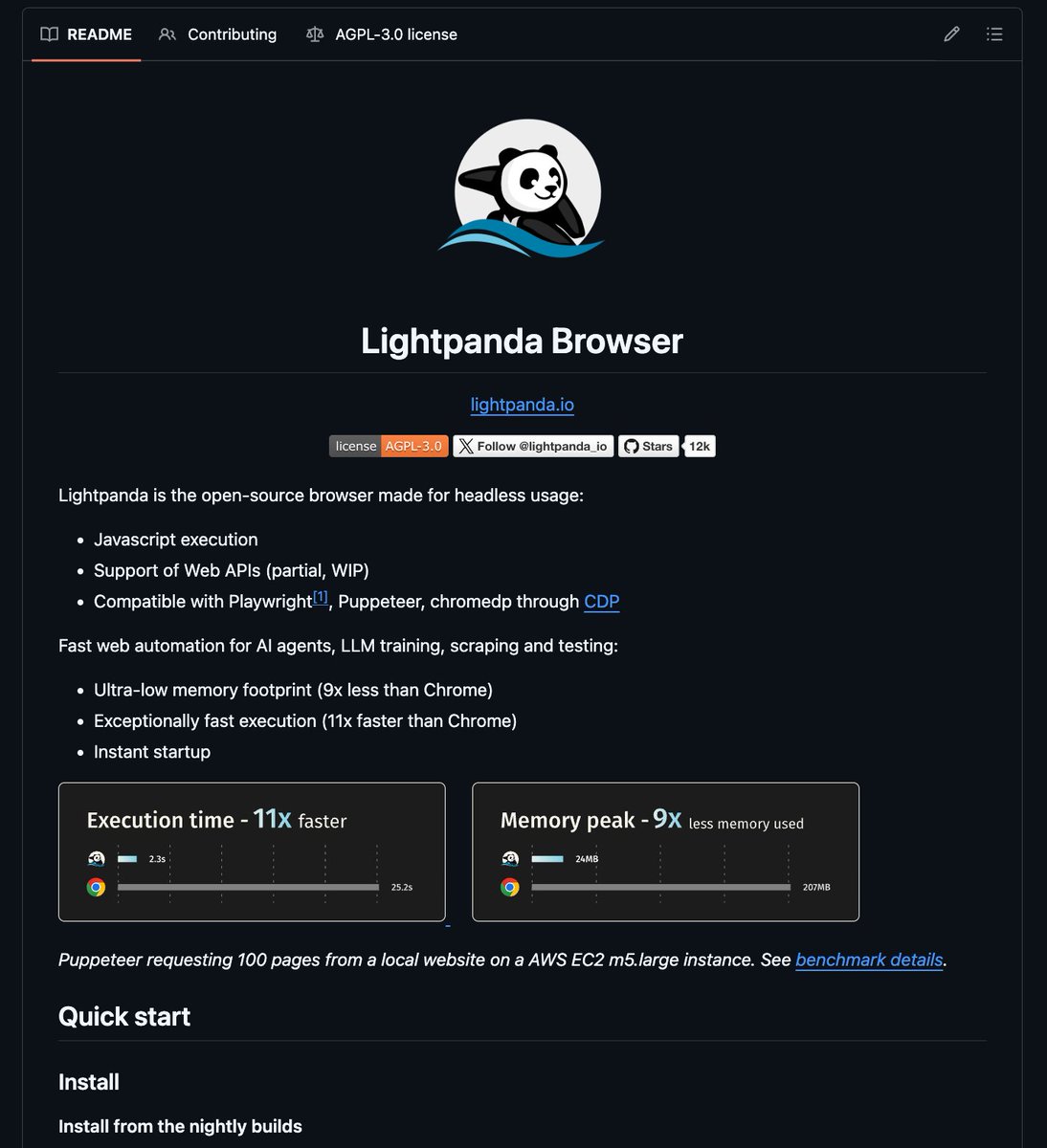
🚨BREAKING: Someone just open-sourced a headless browser that runs 11x faster than Chrome and uses 9x less memory.
It's called Lightpanda and it's built from scratch specifically for AI agents, scraping, and automation.
Not a Chromium fork. Not a hack. A completely new browser written in Zig.
Here's why this changes everything for AI builders: ↓
It's called Lightpanda and it's built from scratch specifically for AI agents, scraping, and automation.
Not a Chromium fork. Not a hack. A completely new browser written in Zig.
Here's why this changes everything for AI builders: ↓
2
Chrome for headless AI work is a disaster.
→ Eats 1GB+ RAM per instance
→ Slow cold starts
→ Bloated with features you'll never use
→ Nightmare to deploy at scale
If you're running 100s of AI agent sessions simultaneously, Chrome bills are killing you.
→ Eats 1GB+ RAM per instance
→ Slow cold starts
→ Bloated with features you'll never use
→ Nightmare to deploy at scale
If you're running 100s of AI agent sessions simultaneously, Chrome bills are killing you.
3
Lightpanda fixes all of that.
→ 11x faster execution than Chrome
→ 9x lower memory footprint
→ Instant startup
→ Full JavaScript execution
→ Supports Playwright, Puppeteer, and chromedp via CDP
Same scripts. Zero rewrites. Just plug it in.
→ 11x faster execution than Chrome
→ 9x lower memory footprint
→ Instant startup
→ Full JavaScript execution
→ Supports Playwright, Puppeteer, and chromedp via CDP
Same scripts. Zero rewrites. Just plug it in.
4
How it works:
Built in Zig (low-level, zero-overhead systems language)
No graphical rendering layer = no wasted compute
Runs a CDP server on port 9222
Drop-in replacement for Chrome in any Puppeteer/Playwright workflow in one line:
browserWSEndpoint: "ws://127.0.0.1:9222"
Built in Zig (low-level, zero-overhead systems language)
No graphical rendering layer = no wasted compute
Runs a CDP server on port 9222
Drop-in replacement for Chrome in any Puppeteer/Playwright workflow in one line:
browserWSEndpoint: "ws://127.0.0.1:9222"
5
What it already supports:
→ Full JS execution (V8 engine)
→ Ajax, XHR, Fetch API
→ DOM APIs + HTML parsing
→ Cookies, custom headers, proxy support
→ Network interception
→ robots.txt compliance
→ Docker images for amd64 and arm64
→ Linux, macOS, Windows (WSL2)
→ Full JS execution (V8 engine)
→ Ajax, XHR, Fetch API
→ DOM APIs + HTML parsing
→ Cookies, custom headers, proxy support
→ Network interception
→ robots.txt compliance
→ Docker images for amd64 and arm64
→ Linux, macOS, Windows (WSL2)
6
Real benchmark:
Puppeteer requesting 100 pages on AWS EC2 m5.large:
Chrome → baseline
Lightpanda → 11x faster, 9x less RAM
If you're running AI web agents at any kind of scale, this is the difference between a $500/month infra bill and a $50 one.
Puppeteer requesting 100 pages on AWS EC2 m5.large:
Chrome → baseline
Lightpanda → 11x faster, 9x less RAM
If you're running AI web agents at any kind of scale, this is the difference between a $500/month infra bill and a $50 one.
7
8
I hope this was helpful to you.
I post AI tools, AI industry news, and AI business related content.
If you're interested in such posts:
1. Follow me at @thisdudelikesai
2. Repost the post to help others
Thanks for checking...
I post AI tools, AI industry news, and AI business related content.
If you're interested in such posts:
1. Follow me at @thisdudelikesai
2. Repost the post to help others
Thanks for checking...
View Tweet