@rubenhassid: How to set up the Claude compl...
@rubenhassid
23 views
Mar 12, 2026
1
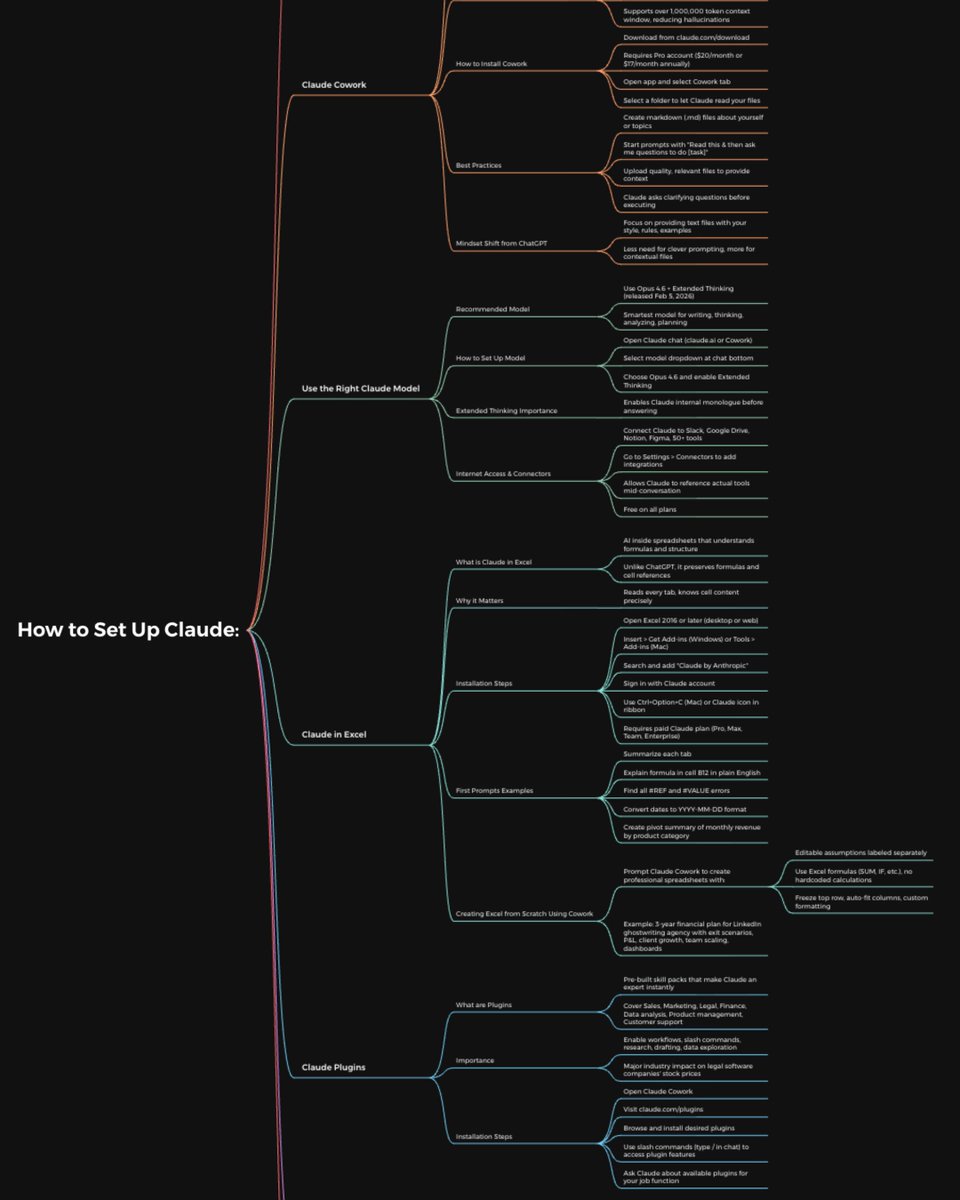
How to set up the Claude completely in just 1 day:
(Save this. Send it to your team. Thank me later.)
Tool 1: Cowork
Download Claude (claude .com/download).
Open the Cowork tab.
Select a folder from your computer.
Now build your brain file. Create "about-me .md."
To download mine, go here: how-to-ai.guide.
Don't pay anything. It's free in the welcome email.
Then, start every chat with this prompt:
"Read the files first. Then ask me questions before doing anything."
Tool 2: Model
Pick Opus 4.6 (it's the best model right now).
Turn on Extended Thinking.
Most skip this & wonder why Claude feels generic.
Then go to Settings > Connectors.
Link Slack, Google Drive, Notion.
Claude now reads your actual workspace.
Tool 3: Excel
Open Excel. Go to Insert > Get Add-ins.
Search "Claude by Anthropic." Install.
Open any spreadsheet. Ask: "Give me a summary of each tab." Claude lives inside the spreadsheet. It knows what D14 actually contains.
Tool 4: Plugins
Go to claude .com/plugins.
Pick the one as per your job.
Marketing. Sales. Legal. Finance. Data.
Click install. Type / in your next chat.
Legal software companies lost $285B in market cap when these dropped. That's a signal.
Tool 5: Artifacts
Nothing to install. Ask Claude to build something.
"Create an interactive HTML calculator for [thing]."
You get a working tool inside the chat. Not text. Not a suggestion. A thing you click and use.
Tool 6: Projects
Go to claude .ai. Click Projects. Create one. Upload your files and add instructions. Every chat inside the project remembers your context.
Honest take: Cowork replaced this for me.
But for teams, it still works.
Where Claude falls short:
No image generation. Use Gemini.
Not the best at real-time search. Use Grok.
Not the best at everything. No tool is.
But for writing, thinking, analyzing, and working with your files? It's the best.
The real difference:
Most people open Claude, type one prompt, get a mid response, and leave.
Because they set up one tool out of six.
Set up all six. It takes 1 day.
Then you'll understand why everyone switched.
Full setup guide + features: how-to-claude.ai
Full Claude cowork set up: claude-co.work
Follow for more @rubenhassid
(Save this. Send it to your team. Thank me later.)
Tool 1: Cowork
Download Claude (claude .com/download).
Open the Cowork tab.
Select a folder from your computer.
Now build your brain file. Create "about-me .md."
To download mine, go here: how-to-ai.guide.
Don't pay anything. It's free in the welcome email.
Then, start every chat with this prompt:
"Read the files first. Then ask me questions before doing anything."
Tool 2: Model
Pick Opus 4.6 (it's the best model right now).
Turn on Extended Thinking.
Most skip this & wonder why Claude feels generic.
Then go to Settings > Connectors.
Link Slack, Google Drive, Notion.
Claude now reads your actual workspace.
Tool 3: Excel
Open Excel. Go to Insert > Get Add-ins.
Search "Claude by Anthropic." Install.
Open any spreadsheet. Ask: "Give me a summary of each tab." Claude lives inside the spreadsheet. It knows what D14 actually contains.
Tool 4: Plugins
Go to claude .com/plugins.
Pick the one as per your job.
Marketing. Sales. Legal. Finance. Data.
Click install. Type / in your next chat.
Legal software companies lost $285B in market cap when these dropped. That's a signal.
Tool 5: Artifacts
Nothing to install. Ask Claude to build something.
"Create an interactive HTML calculator for [thing]."
You get a working tool inside the chat. Not text. Not a suggestion. A thing you click and use.
Tool 6: Projects
Go to claude .ai. Click Projects. Create one. Upload your files and add instructions. Every chat inside the project remembers your context.
Honest take: Cowork replaced this for me.
But for teams, it still works.
Where Claude falls short:
No image generation. Use Gemini.
Not the best at real-time search. Use Grok.
Not the best at everything. No tool is.
But for writing, thinking, analyzing, and working with your files? It's the best.
The real difference:
Most people open Claude, type one prompt, get a mid response, and leave.
Because they set up one tool out of six.
Set up all six. It takes 1 day.
Then you'll understand why everyone switched.
Full setup guide + features: how-to-claude.ai
Full Claude cowork set up: claude-co.work
Follow for more @rubenhassid
View Tweet