@4A4133: ## Starting with JA4: TLS Cli...
Starting with JA4:
TLS Client Fingerprint
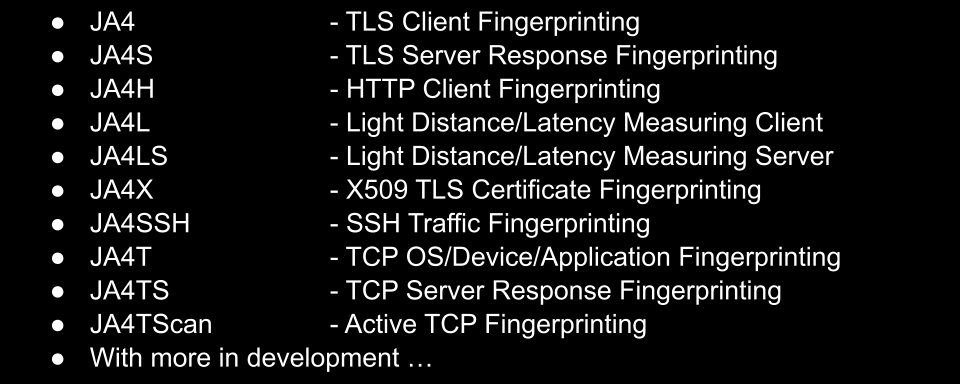
JA4 (the replacement to JA3) fingerprints clients based on their TLS Client Hello packet which is sent before encryption, allowing you to know what's talking on the network without the need to break encryption.

Chrome 132:
JA4=t13d1517h2_8daaf6152771_b6f405a00624
AnyDesk:
JA4=t12i550500_168bb377f8c8_a1e935682795
SoftEther VPN:
JA4=t13d880900_fcb5b95cb75a_b0d3b4ac2a14
Sliver Malware (GoLang):
JA4=t13d190900_9dc949149365_97f8aa674fd9
JA4Server - JA4S:
TLS Server Response Fingerprint
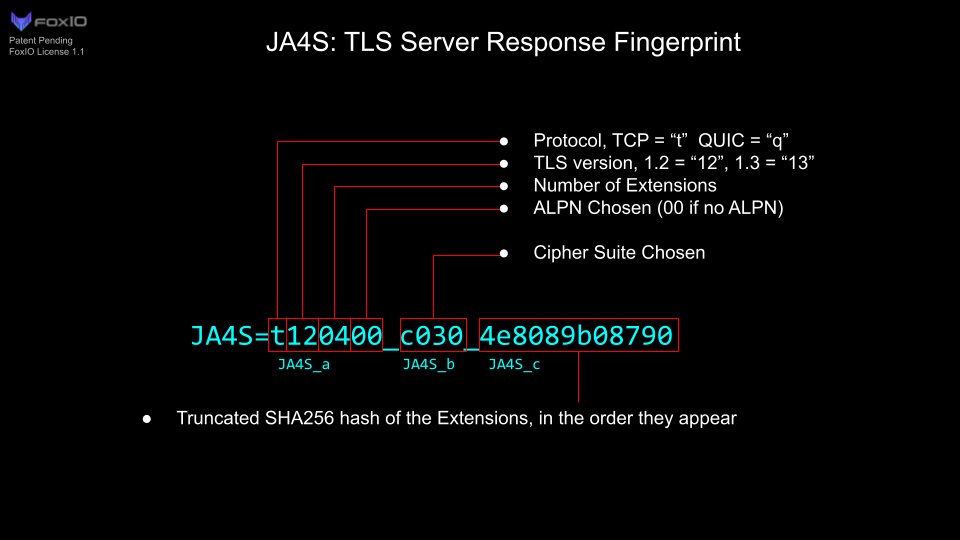
Each TLS server may respond to different clients differently but will always respond to the same client with the same fingerprint which allows for higher fidelity detection.
AnyDesk:
JA4=t12i550500_168bb377f8c8_a1e935682795 JA4S=t120300_009f_cef8820c8f19
SoftEther VPN:
JA4=t13d880900_fcb5b95cb75a_b0d3b4ac2a14 JA4S=t130200_1302_a56c5b993250
Addigy (written in Go):
JA4=t13d190900_9dc949149365_97f8aa674fd9 (Go)
JA4S=t130200_1301_234ea6891581 <-- (Addigy server response to Go)
Sliver Malware (written in Go)
JA4=t13d190900_9dc949149365_97f8aa674fd9 (Go)
JA4S=t130200_1301_a56c5b993250 <-- (C2 response to Go)
When looking for certain traffic, rarely do you want to rely on JA4 alone as there could be too many FPs, instead you want to combine as many fingerprints and additional metadata as possible such as JA4 AND JA4S AND JA4X, etc.
The more fingerprints you can combine along with other metadata, the higher fidelity detection you can build.
JA4HTTP - JA4H:
HTTP Client Fingerprint


Parts 'a' and 'b' are effectively a fingerprint of the application. In the above example, Lumma C2 pretends to be the Tesla Browser in its user-agent string, yet you can clearly see that, when doing a post request over HTTP/1.1, their fingerprints look completely different. Just another reason to never trust user-agent strings.
Part 'c' is the fingerprint of the cookie. Each website/app defines what it's cookie fields should be, therefor everyone connecting to a Fortigate Firewall, for example, should all have the exact same JA4H_c fingerprint, because the cookie fields are set by the Fortigate upon login. Anyone with a different cookie is probably a hacking tool.
Part 'd' is the user's cookie fingerprint, this is unique to that user as it includes their session token and other specific data. This allows you to track a user through your site with JA4H_d and if it stays the same but the application fingerprint changes from Chrome to say, Cobalt Strike, then that's session hijacking. Easy.
JA4X509 - JA4X:
X509 TLS Certificate Fingerprint
JA4X fingerprints the structure of a cert, not the values within it. This essentially makes it a fingerprint of the application or script used to create a cert, not a fingerprint of the cert itself. As such, it's great for finding things like SOHO devices and malware C2s.
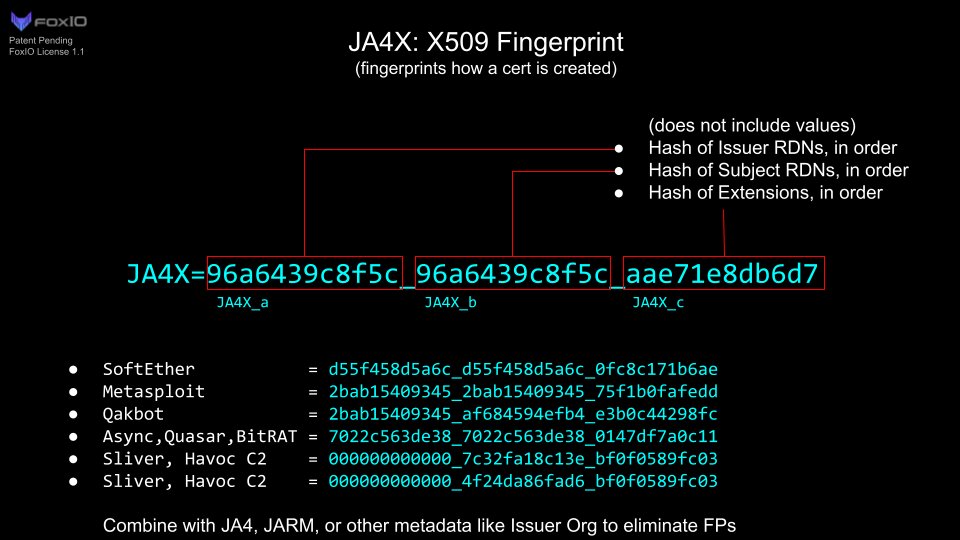
When combined with other metadata this becomes an extremely powerful tool for classifying objects on the internet. For example, here's a bunch of live Cobalt Strike C2s found using nothing but JA4X and Issuer: https://driftnet.io/search/summary?t=ja4x-hash%3A%3Ais%3A2166164053c1_2166164053c1_30d204a01551&t=issuer%3A%3Ais%3AMicrosoft+Corporation
JA4SSH:
SSH Traffic Fingerprinting
JA4SSH allows you to understand what is happening within a SSH session without the need to break encryption.

The key to JA4SSH is in looking at the TCP ACK packets which do not contain payloads as it is the side making the requests that send those ACK packets. So a session with double-padded 76-byte packet lengths and all ACKs coming from the server-side means that the server is typing to the client, a classic reverse SSH shell. Remember, SSH is encrypted packets, not an encrypted tunnel, so OSI Layer 4 is sent in the clear and that is how we can tell what is happening. Mind blown right? I almost crashed my car when I had that epiphany.
JA4TCP - JA4T
JA4TCPServer - JA4TS
JA4TCPScan - JA4TScan
TCP Fingerprinting

JA4T fingerprints the SYN packet, which happens in the clear before encryption, and allows for the passive identification of source operating systems.

Key to JA4T is preserving the observed window size and MSS. This allows us to not only identify the source OS, but the medium of which it is communicating through.

JA4TS fingerprints the server response which, like JA4S, is different per client. It's great at increasing detection fidelity but is not a good way to fingerprint the server OS. For that, we have JA4TScan, an active TCP server fingerprinting tool that takes into account the timing between TCP retransmissions.
As there are no requirements for TCP retransmission timings, it's up to the human who wrote the netcode for that OS to set it to whatever they feel like, thereby making them unique. This is an excellent way to fingerprint operating systems with just a single SYN packet.

JA4Latency - JA4L
JA4LatencyServer - JA4LS
JA4L measures the latency between handshakes at session setup. Because the speed of light is finite, JA4L/S make it possible to calculate the true source location of traffic on the internet.

It even works over UDP, so much so, I'd argue it works best over UDP.

JA4DB:
The JA4+ Database of Fingerprints
https://ja4db.com/ is where you can easily convert a JA4+ fingerprint to application. We're actively building a new DB site that will be community driven, think VirusTotal but for network fingerprints. Expect that soon!
JA4+ Code:
JA4+ is available on a lot of commercial and open source tools. For more details see:
https://github.com/FoxIO-LLC/ja4
https://github.com/FoxIO-LLC/ja4tscan
The FoxIO License makes JA4+ permissive for research, academic, internal business and personal use but not permissive for monetization, ie. selling JA4+ in a product. Monetization requires a separate license, simply reach out to info@foxio.io for that.
For more from FoxIO, see https://foxio.io/
And if you have any questions, just ask!