@EHuanglu: 2025 is the year 3D AI takes o...
@EHuanglu
18 views
Dec 03, 2024
1
2025 is the year 3D AI takes over!
Meshy AI lets you turn a single image into high-quality 3D model. Then, you can choose any angle and bring it to life with an AI video generator.
3D AI is the future of content creation.
Here’s how to get started step by step:
Meshy AI lets you turn a single image into high-quality 3D model. Then, you can choose any angle and bring it to life with an AI video generator.
3D AI is the future of content creation.
Here’s how to get started step by step:
2
Step 1: Create Character
Create your own character with an AI image generator!
I use @freepik because it gives me super detailed images and plenty of customization options to get exactly what I want.
Create your own character with an AI image generator!
I use @freepik because it gives me super detailed images and plenty of customization options to get exactly what I want.

3
Step 2: Head over to the Meshy AI website and click on the “Image to 3D” option.
Tip: They offer 200 free credits every day, so you can create a ton of 3D models for free!
meshy.ai
Tip: They offer 200 free credits every day, so you can create a ton of 3D models for free!
meshy.ai
4
Step 4: Upload your image
Once the image is uploaded, you can paste the prompt you used and paste as Name for your 3D model.
Once the image is uploaded, you can paste the prompt you used and paste as Name for your 3D model.

5
Step 5: Choose your model
For each generation, you’ll get four 3D models to choose from. Pick the one with the best mesh for your project!
For each generation, you’ll get four 3D models to choose from. Pick the one with the best mesh for your project!

6
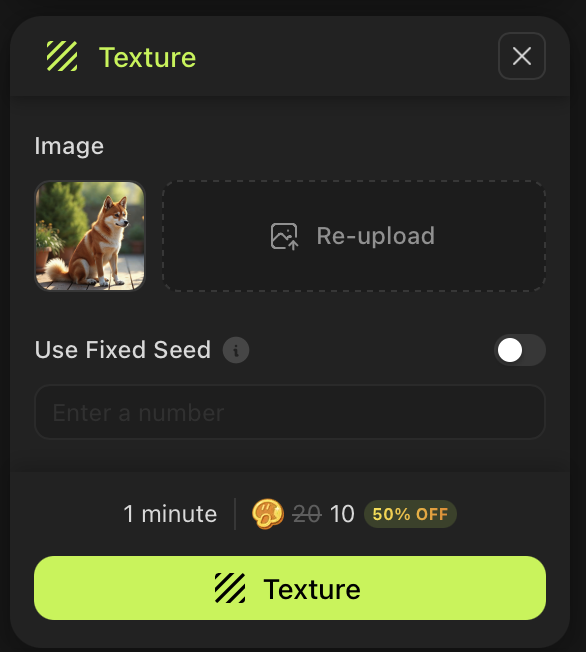
Step 6: Add texture to your model
Simply click the texture button, and the texture image will be uploaded automatically.
Simply click the texture button, and the texture image will be uploaded automatically.
7
Step 7: Animate your model
You can rig your 3D model to add animations directly, or render it and bring it to life using an AI video generator with the image-to-video feature.
You can rig your 3D model to add animations directly, or render it and bring it to life using an AI video generator with the image-to-video feature.

8
Found this helpful? Follow me @EHuanglu
I’m always testing the latest AI tools and sharing all my discoveries, don’t miss out!
I’m always testing the latest AI tools and sharing all my discoveries, don’t miss out!
